



Viral Earring Trend Free Video Prompt
VIDEO Prompt
Video Prompt
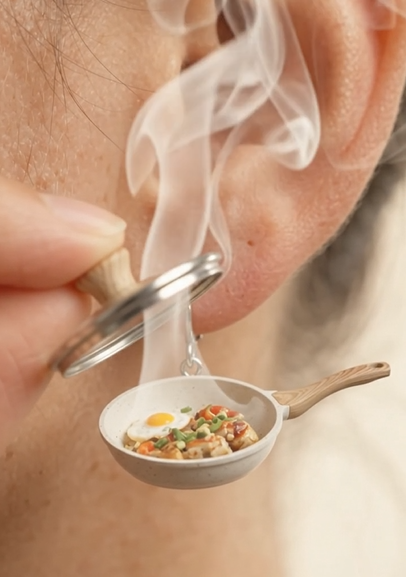
Create a highly realistic 9-second vertical 9:16 commercial macro video using the UPLOADED OBJECT as the exact master reference. IMPORTANT: The uploaded object must be transformed into a tiny, wearable, functional-looking earring while preserving its recognizable identity, shape, colors, materials, textures, logo/details, and overall design. Do not redesign or replace the object.
SCENE: Extreme macro close-up of a person’s ear and earlobe wearing the miniature version of the uploaded object as a realistic earring. The earring is physically attached to the ear and has believable weight, reflections, tiny details and natural movement.
ACTION:
0–2s: Static macro shot. The camera focuses sharply on the miniature uploaded-object earring. Natural skin pores, fine hairs and realistic metallic/object texture are clearly visible. 2–4s: A human finger slowly enters the frame and gently interacts with the miniature object, opening/lifting its functional lid, flap, cap, compartment or movable part according to the object’s design.
4–7s: As the miniature object opens, reveal a tiny portion of appetizing, realistic food inside it. Immediately release thick, natural white steam from the food. Steam rises upward around the ear and catches the studio light. 7–9s: The earring gently sways from the finger movement and settles naturally. The camera remains focused on the uploaded object and the revealed food, creating a satisfying surreal product-advertisement moment.
VISUAL STYLE:
Ultra-realistic commercial advertisement, premium macro photography, polished reflective materials, extremely detailed textures, realistic human skin, realistic food texture, soft bright diffused studio lighting, high-key lighting, shallow depth of field, creamy background bokeh.
CAMERA:
Static macro close-up, no camera shake, macro lens, very shallow depth of field, sharp focus on the uploaded-object earring and food, background softly blurred. SOUND: Realistic tiny metallic click/opening sound, subtle mechanical movement, gentle earring clink, followed by a soft realistic steam hiss. No dialogue or music.
STRICT RULES: Uploaded object = exact master reference. Preserve its identity, proportions, colors, materials and recognizable details. Do not randomly redesign the object. The miniature earring must look physically attached and wearable. Realistic steam and food physics.
No magical effects, floating objects or sudden morphing. No extra jewelry. No text or logos unless they already exist on the uploaded object. Photorealistic, premium advertisement quality. 9:16 vertical, 4K, highly detailed.
How to Customize the Viral Earring Trend Free Video Prompt?
The Viral Earring Trend Free Video Prompt can be customized according to your jewelry design, brand style, background, camera movement, and desired video effect. Instead of using the prompt exactly as written every time, replace the relevant details with information about your own product.
1. Replace the Earring Description
Start by describing the exact earring you want the AI to animate.
For example, you can replace the product description with:
-
Gold hoop earrings
-
Diamond stud earrings
-
Pearl drop earrings
-
Silver chandelier earrings
-
Ruby gemstone earrings
-
Minimalist luxury earrings
Be specific about the material, color, gemstones, shape, size, and design.
2. Customize the Jewelry Material
Mention the material you want the AI to preserve. For example:
“Preserve the exact 18K gold finish, polished metal surface, and natural reflections.”
You can change this to silver, platinum, rose gold, white gold, or another material that matches your product.
3. Change the Gemstones
If your earring contains gemstones, specify them clearly.
For example:
“Preserve the original diamond arrangement, gemstone size, cut, color, and placement.”
This helps reduce unwanted changes to important product details.
4. Customize the Background
You can change the environment according to your brand aesthetic.
Try backgrounds such as:
-
Luxury jewelry showroom
-
Elegant black studio
-
Soft beige studio
-
Marble surface
-
Romantic candlelit setting
-
Minimal white background
-
Luxury fashion environment
For premium jewelry brands, a simple background often keeps attention on the product.
5. Change the Camera Movement
Camera movement can dramatically change the feeling of the video.
You can request:
“Slow cinematic camera push-in toward the earring.”
Or:
“Smooth 360-degree camera movement around the jewelry.”
Other options include a gentle zoom, macro close-up, slow orbit, or subtle side-to-side camera movement.
6. Customize the Lighting
Lighting is especially important for jewelry because it controls how gemstones and metal surfaces appear.
For a luxury look, try:
“Soft studio lighting with realistic highlights, controlled reflections, subtle shadows, and sparkling gemstone details.”
You can also experiment with warm, cool, dramatic, or natural lighting depending on your brand style.
7. Add Your Brand Style
If the video is for a jewelry business, customize the prompt to match your brand identity.
You can specify:
-
Luxury and sophisticated
-
Minimal and modern
-
Elegant and feminine
-
Bold and glamorous
-
Premium editorial
-
Fashion-forward
For example:
“Create a sophisticated luxury jewelry advertisement with a premium editorial aesthetic.”
8. Customize the Video Format
For social media, specify the desired format directly in your workflow.
For Reels, TikTok, and YouTube Shorts, use:
“Vertical 9:16 composition, optimized for short-form social media video.”
You can also specify the approximate duration supported by your AI video generator.
9. Add a Final Product Shot
A strong ending can make the video more useful for marketing.
Add instructions such as:
“End with a clean macro hero shot of the complete earring, keeping the product sharply focused and centered in the frame.”
This gives you a clear product-focused ending that can be used with a logo, CTA, or product name during editing.
10. Keep the Product Consistent
This is one of the most important customization steps. Whenever you modify the prompt, keep instructions such as:
“Preserve the exact original earring design, shape, proportions, gemstones, colors, materials, and visible details throughout the entire video.”
This helps reduce unwanted AI alterations.
Quick Customization Formula
You can customize the Viral Earring Trend Free Video Prompt using this simple formula:
[Earring type] + [material] + [gemstones] + [background] + [lighting] + [camera movement] + [animation] + [final product shot] +

For example:
Diamond drop earrings + 18K white gold + natural diamonds + luxury black studio + soft cinematic lighting + slow macro camera movement + elegant realistic movement + final close-up product shot + preserve the exact original design.
This approach allows you to create multiple variations of the same trend while keeping the jewelry product recognizable and visually consistent.
Pro Tips for Using the Viral Earring Trend Free Video Prompt
To get a more realistic and visually appealing result from the Viral Earring Trend Free Video Prompt, follow these tips:
1. Use a High-Quality Earring Image
Start with a clear, high-resolution product image. Make sure the earring is fully visible and has good lighting. A sharp reference image helps AI preserve the jewelry’s shape, stones, colors, and details.
2. Keep the Product Design Consistent
When using the Viral Earring Trend Free Video Prompt, clearly instruct the AI to preserve the original earring design. Avoid unnecessary changes to the gemstone arrangement, metal color, shape, or proportions.
3. Use a Clean Background
A simple luxury background can make the jewelry stand out. Neutral, elegant, or softly blurred backgrounds usually work better than busy scenes.
4. Add Realistic Jewelry Movement
For a more premium result, describe subtle movements such as gentle rotation, swinging, reflections, and natural interaction with light. Avoid excessive movement that can distort the earring.
5. Focus on Lighting and Reflections
Jewelry looks more realistic when the prompt specifies controlled studio lighting, realistic reflections, natural highlights, and detailed gemstone sparkle.
6. Generate in Vertical Format
For TikTok, Instagram Reels, YouTube Shorts, and similar platforms, use a 9:16 vertical format. This allows the finished AI video to fit short-form content platforms more naturally.
7. Generate Multiple Versions
AI video generation can produce different results each time. Create several variations and select the version with the most accurate product details and smoothest movement.
Common Mistakes When Using the Viral Earring Trend Free Video Prompt
hat all visible product details should be preserved.
5. Using an Overly Complicated Background
A busy background can distract from the jewelry and make the final video look less like a professional product advertisement.
Solution: Use a clean luxury environment with subtle depth of field.
6. Forgetting the Final Product Shot
The video should clearly show the finished earring at the end.
Solution: Include a final close-up or hero product shot where the earring is clearly visible.
Prompt Summary
The Viral Earring Trend Free Video Prompt makes it easier to create engaging AI-generated jewelry videos from a product reference image. For the best results, use a high-quality earring image and clearly instruct the AI to preserve the original design, materials, gemstones, proportions, and details.
You can customize the prompt by changing the earring type, material, gemstones, background, lighting, camera movement, animation style, and final product shot to match your jewelry brand. Keep the product movement smooth and realistic, and use a vertical 9:16 composition for platforms such as Instagram Reels, TikTok, and YouTube Shorts.
With the right reference image and prompt customization, you can turn a simple earring product photo into an eye-catching AI jewelry video suitable for social media content, product promotion, and advertising.
Related AI Ads Prompts
Step by Step Viral Ad Creation Tutorial using Google Flow
- Clay Sculpting AI Video ads using Google Flow Free Prompt
- Almond shell carving video Free Prompt
- Wooden Build Transformation Video Free prompt
- Object Assembly Animation
- Independence Day Light Viral Shot Free Prompt
- Micro Vehicle Unboxing Video Free Prompt
- Hair to waterfall Free Prompt
- Tsunami Miniature Behind the scenes Free Prompt
- Crystal Ball Reveal Video Free Prompt
- Action Figure Assembly 14 August Video Free Prompt
- Creature to Jewelry Transformation Video Prompt
- Giant Animal Movie BTS Free Video Prompt
- Time Freeze Viral Video Prompt
- AI Billboard Ads Video Prompt
- Rolls Royce Car Instagram Trend Video Prompt
- Viral Earring Trend Free Video Prompt
Find quick answers to the most common questions about
Viral Earring Trend Free Video Prompt
. Discover how this simple editing step can instantly make your content more engaging, professional, and ready to grab attention in 2026.
The Viral Earring Trend Free Video Prompt is an AI video-generation prompt designed to help creators turn an earring or jewelry reference image into an engaging short-form video. It can be used for social media content, product promotion, and jewelry advertisements.
Yes. You can adapt the prompt for earrings, jewelry collections, and other fashion accessories. For the best results, provide a clear product reference image and specify that the original product design should be preserved.
Use a high-quality image with good lighting and a clear view of the entire earring. Product photos with minimal background distractions generally provide better reference information for AI video generation.
What aspect ratio should I use?
A 9:16 vertical aspect ratio is recommended when creating content for Instagram Reels, TikTok, and YouTube Shorts.
How can I make my AI earring video look more realistic?
Focus on realistic lighting, natural reflections, accurate materials, subtle movement, realistic shadows, and consistent product geometry. Avoid excessive transformations or unrealistic camera movements.
Can I use this prompt for jewelry advertisements?
Yes. The Viral Earring Trend Free Video Prompt can be adapted for jewelry marketing and social media advertisements. You can also add product-focused camera shots, luxury backgrounds, brand colors, and promotional text during editing.
Why does AI sometimes change my earring design?
AI video models may reinterpret small or complex product details during animation. This can happen when the reference image is unclear or when the prompt does not strongly emphasize product consistency.
Can I make the video longer than 10 seconds?
Yes. A longer duration can provide more time for detailed assembly, especially for complex vehicles with intricate wheels, headlights and bodywork.
Can I use this for TikTok and Instagram Reels?
Yes. The prompt can be customized for 9:16 vertical aspect ratio, making it suitable for vertical short-form video formats.
Can I add music?
Yes, but the current version intentionally uses only realistic magnetic clicking and workshop sounds to emphasize the satisfying DIY/ASMR effect. Music can be added separately during editing if desired.
How do I prevent jewelry distortion?
Use a high-quality reference image and explicitly instruct the AI to preserve the exact product shape, materials, gemstones, proportions, and visible details. Keeping the animation simple and controlled can also reduce distortion.
Can I edit the generated video after creating it?
Yes. You can further edit the generated video by adding music, captions, transitions, logos, product information, and calls to action using a video editor such as CapCut or another editing application.
Can I edit the generated video after creating it?
Yes. You can further edit the generated video by adding music, captions, transitions, logos, product information, and calls to action using a video editor such as CapCut or another editing application.
Is the Viral Earring Trend Free Video Prompt suitable for beginners?
Yes. The prompt can be used by beginners who want to experiment with AI-generated jewelry videos without having advanced video-editing or 3D animation skills.
