


Social media is filled with mesmerizing product assembly animation videos. Products float into the frame, parts assemble automatically, packaging closes itself, and the final product looks ready for sale—all in just a few seconds.
The best part?
You no longer need expensive 3D software or professional animators.
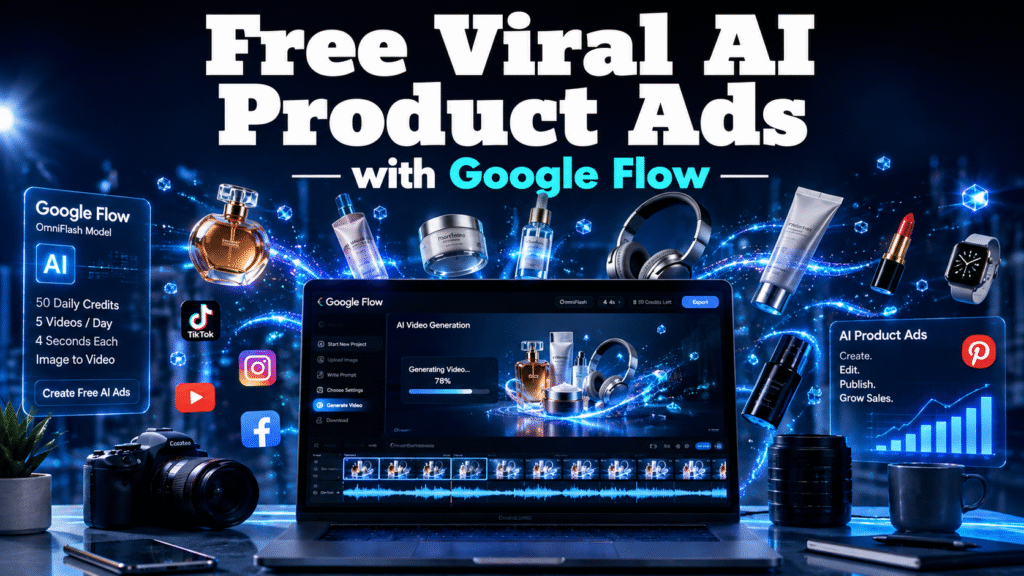
With Google Flow Free and the OmniFlash AI model, you can create professional Viral AI Product Ads from a single product image completely free.
If you’re an ecommerce business owner, Shopify seller, Amazon seller, dropshipping entrepreneur, or digital marketer, this guide will show you exactly how to generate AI video ads that attract attention and increase conversions.
Short-form videos dominate every major platform:
- TikTok
- Instagram Reels
- Facebook Reels
- YouTube Shorts
Animated product reveal videos stop users from scrolling because they create curiosity.
Instead of simply showing a product, they tell a visual story.
Benefits include:
- Higher watch time
- Better engagement
- More clicks
- Increased product trust
- Higher conversion rates
- Premium brand appearance
Google Flow is Google’s AI filmmaking platform that lets creators generate videos using advanced AI models.
Using the OmniFlash model, you can create realistic 4-second cinematic videos from images and prompts.
Even better, Google Flow Free currently provides:
| Feature | Free Plan |
|---|---|
| Daily Credits | 50 Credits |
| AI Model | OmniFlash |
| Videos Per Day | Approximately 5 videos |
| Video Length | Around 4 seconds each |
| Image-to-Video | Yes |
| Text Prompt Support | Yes |
For most ecommerce businesses, 5 AI video ads every day are more than enough to create one complete marketing video by combining multiple clips.
Google Flow is ideal for:
- Ecommerce business owners
- Shopify stores
- Amazon sellers
- Beauty brands
- Cosmetic companies
- Fashion brands
- Electronics sellers
- Home decor brands
- Small businesses
- Marketing agencies
- Freelancers
- Content creators
Let us dive into the process of video ad creation using Google Flow.
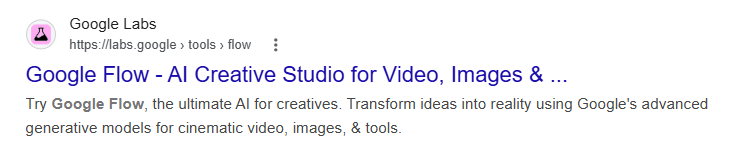
Start New Project
This opens the workspace where you’ll generate your AI video ads.
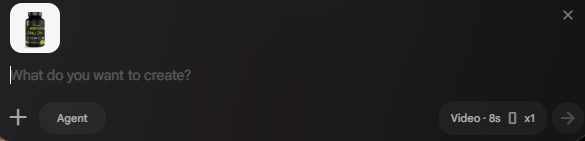
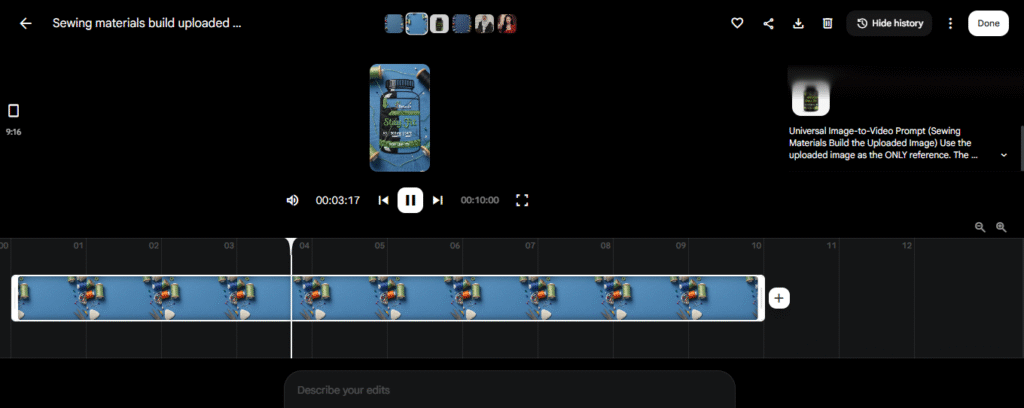
Object Assembly animation video ad creation Prompt:
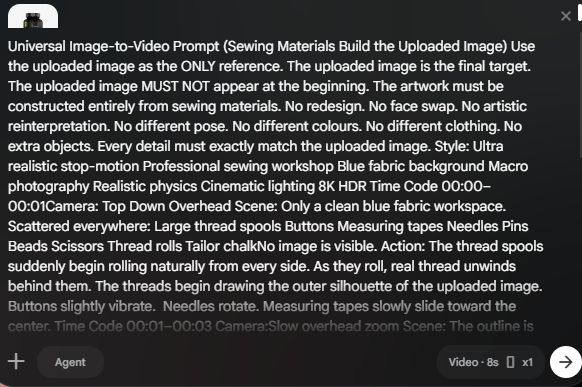
“(Sewing Materials Build the Uploaded Image) Use the uploaded image as the ONLY reference. The uploaded image is the final target. The uploaded image MUST NOT appear at the beginning. The artwork must be constructed entirely from sewing materials. No redesign. No face swap. No artistic reinterpretation. No different pose. No different colours. No different clothing. No extra objects. Every detail must exactly match the uploaded image. Style: Ultra realistic stop-motion Professional sewing workshop Blue fabric background Macro photography Realistic physics Cinematic lighting 8K HDR Time Code 00:00–00:01Camera: Top Down Overhead Scene: Only a clean blue fabric workspace. Scattered everywhere: Large thread spools Buttons Measuring tapes Needles Pins Beads Scissors Thread rolls Tailor chalkNo image is visible. Action: The thread spools suddenly begin rolling naturally from every side. As they roll, real thread unwinds behind them. The threads begin drawing the outer silhouette of the uploaded image. Buttons slightly vibrate. Needles rotate. Measuring tapes slowly slide toward the center. Time Code 00:01–00:03 Camera:Slow overhead zoom Scene: The outline is now visible. Action: Thread spools continue rolling around the artwork. Long threads stretch realistically across the fabric. Buttons jump into their exact positions.Pins fly gently into place.] Measuring tapes curve naturally.Every sewing material begins assembling the uploaded image exactly. Time Code 00:03–00:05 Camera: Macro Zoom Scene: The uploaded image becomes more recognizable. Action: Thread spools rotate while continuously feeding thread. The thread fills facial features, clothing details, textures and edges. Buttons complete circular details. Needles stitch moving thread into position.Pins lock the thread. Everything follows realistic sewing physics. Time Code 00:05–00:07 Camera: Close Macro Scene: Only a few empty spaces remain. Action: The last thread spool slowly rolls across the artwork. A sewing needle pulls thread through the final section. Buttons snap into place. Pins finish fixing the design. The uploaded image becomes almost complete. Time Code 00:07–00:10 Camera: Slow Zoom Out Scene: Complete artwork. Action: Every thread spool slowly stops rolling. Loose thread gently settles. Buttons shine softly.Pins remain fixed. The completed sewing artwork is an EXACT recreation of the uploaded image with identical identity, colours, proportions, textures, clothing, logos and every detail. Nothing changes after completion. Quality: Ultra Realistic Photorealistic Stop Motion Macro Detail Professional Embroidery Thread Art 8K HDR Perfect Identity Lock Perfect Colour Match Perfect Shape Match Perfect Texture Match Negative Prompt: No morphing No AI redraw No different face No different object No style transfer No deformation No extra materials No flickering No identity change No artistic reinterpretation”
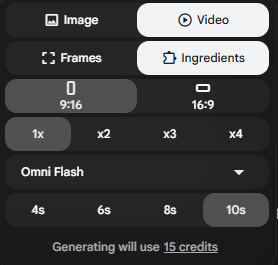
Choose same settings or you can choose duration , ratio and number of videos according to your own requirements.
Press Enter or click on white arrow button, Video will starts generating.
Once complete:
Click Download.
Repeat the same process with different prompts to create multiple scenes.
Since you receive 50 daily credits, you can generate approximately five 4-second videos every day.
These clips can later be combined into a complete advertisement.
If your downloaded video includes a visible watermark:
- Import the video into CapCut Desktop.
- Place it on the timeline.
- Increase the video scale.
- Continue scaling until the watermark moves outside the visible frame.
- Reposition the clip if necessary.
- Export the final video.
Because the watermark is positioned near the edge, a slight zoom usually removes it while keeping the product visible.
Create Complete AI Video Ads
Instead of generating one clip, create several:
- Product assembly
- Product rotation
- Floating animation
- Close-up shot
- Packaging reveal
Combine them inside CapCut Desktop.
Add:
- Music
- Text overlays
- Brand logo
- Call-to-action
Within minutes you’ll have professional Viral AI Product Ads ready for social media.
Best Prompt Ideas
Try creating:
- Floating product reveal
- Exploded assembly animation
- Luxury product showcase
- Cosmetic bottle rotation
- Phone assembly animation
- Perfume cinematic reveal
- Watch reveal
- Jewelry showcase
- Electronics build animation
- Packaging opening animation
Why Ecommerce Businesses Love AI Video Ads?
Traditional video production requires:
- Cameras
- Lighting
- Models
- Studio
- Editors
- Motion designers
AI eliminates nearly all of these costs.
Benefits include:
- Faster production
- Lower cost
- Unlimited variations
- Better testing
- Consistent branding
- Easier content creation
Google Flow Free vs Traditional Product Videos
| Feature | Google Flow Free | Traditional Production |
|---|---|---|
| Cost | Free | High |
| Equipment | None | Cameras & Lights |
| Editing | Minimal | Extensive |
| Production Time | Minutes | Days |
| Product Photos Required | One | Many |
| AI Animation | Yes | Manual |
| Daily Creation | Multiple Videos | Limited |
Best Products for Viral AI Product Ads
Almost any product works well, including:
- Skincare
- Makeup
- Perfumes
- Watches
- Shoes
- Bags
- Headphones
- Smartphones
- Supplements
- Kitchen gadgets
- Home decor
- Electronics
- Jewelry
- Fashion accessories
Common Mistakes
Avoid these mistakes:
- Using blurry product images.
- Writing very short prompts.
- Ignoring camera movement.
- Using poor lighting in the source image.
- Forgetting to generate multiple clips.
- Posting without captions.
- Not adding background music.
- Using stretched product images.
- Exporting in low resolution.
- Creating only one version instead of testing multiple variations.
Pro Tips
- Use transparent PNG product images whenever possible.
- Generate multiple camera angles.
- Keep each clip around four seconds.
- Combine several clips into one advertisement.
- Add subtitles for better engagement.
- Test different hooks during the first three seconds.
- Create square and vertical versions.
- Use trending audio.
- Keep branding consistent.
- Publish regularly across multiple platforms.
Related Viral AI Product Ads
-
Step by Step Viral Ad Creation Tutorial using Google Flow
- Clay Sculpting AI Video ads using Google Flow Free Prompt
- Almond shell carving video Free Prompt
- Wooden Build Transformation Video Free prompt
- Object Assembly Animation
- Independence Day Light Viral Shot Free Prompt
- Micro Vehicle Unboxing Video Free Prompt
- Hair to waterfall Free Prompt
- Tsunami Miniature Behind the scenes Free Prompt
- Crystal Ball Reveal Video Free Prompt
- Action Figure Assembly 14 August Video Free Prompt
- Creature to Jewelry Video Prompt
- Giant Animal Movie BTS Video Prompt FREE
- Time Freeze Viral Video Prompt
- AI Billboard Ads Video Prompt
- Rolls Royce Car Instagram Trend Video Prompt
- Viral Earring Trend Free Video Prompt
-
Summary
Creating Viral AI Product Ads has never been easier. With Google Flow Free, the OmniFlash model, and a single product image, ecommerce business owners can produce high-quality AI video ads without expensive equipment or software.
The free daily credits are enough to generate several short clips that can be combined into engaging product advertisements. Add simple edits in CapCut Desktop, publish consistently, and you’ll have a scalable workflow for creating eye-catching social media content that helps grow brand awareness and sales.
Conclusion
AI is changing how businesses create product advertisements. Instead of relying on costly production teams, you can now build professional AI video ads directly from product images using Google Flow Free.
Whether you sell skincare, fashion, electronics, or home products, Viral AI Product Ads allow you to produce engaging marketing videos quickly and consistently. By taking advantage of Google’s free daily credits, writing detailed prompts, and combining multiple short clips into one polished advertisement, you can create content that stands out on today’s social media platforms while keeping production costs close to zero.
Find quick answers to the most common questions about FREE AI Video Ads Creation using Google Flow. Discover how this Advance Prompts can instantly make your ads more engaging, professional, high converting and ready to grab attention in 2026.
Viral AI Product Ads are short AI-generated promotional videos designed to attract attention on platforms like TikTok, Instagram Reels, Facebook Reels, and YouTube Shorts.
Yes. Google Flow Free currently offers daily free credits that allow users to generate AI videos without purchasing a subscription.
With approximately 50 daily credits, you can generate around five 4-second AI videos using the OmniFlash model.
What is OmniFlash?
OmniFlash is Google’s fast AI video generation model designed for image-to-video creation.
Can I use my own product images?
Yes. Simply upload your product image and generate customized AI video ads.
Which products work best?
Beauty, skincare, electronics, jewelry, fashion, supplements, and household products perform especially well.
Can beginners use Google Flow?
Yes. No animation or video editing experience is required.
Do I need expensive software?
No. Google Flow Free and CapCut Desktop are sufficient for creating professional AI video ads.
Can I post these videos on social media?
Yes. They are perfect for TikTok, Instagram Reels, Facebook, Pinterest, and YouTube Shorts.
Why are AI video ads becoming popular?
They reduce production costs while allowing businesses to create professional marketing content in minutes instead of days.