



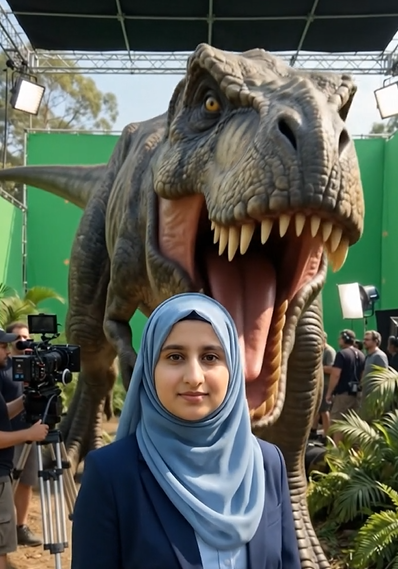
Giant Animal Movie BTS Video Prompt Free using Google Flow
Image Prompt
First generate image using your own image and writing name of animal in the prompt. Then again write name of animal in the prompt and using generated image create video using Google Flow.
ANIMAL: "[ENTER ANY SNAKE ]" HUMAN REFERENCE IMAGE:
Use the uploaded person's image as the exact identity reference. CRITICAL POSITION AND ORIENTATION: Create an ultra-photorealistic cinematic scene with the PERSON standing between the CAMERA and the gigantic "[ANIMAL]". The PERSON'S FACE must be DIRECTLY FACING THE CAMERA. The PERSON'S FRONT BODY and FACE must be clearly visible to the camera. The gigantic "[ANIMAL]" must be positioned DIRECTLY BEHIND THE PERSON. The animal must be facing the PERSON'S BACK. Therefore the exact arrangement is: CAMERA PERSON'S FACE + FRONT BODY PERSON'S BACK GIANT ANIMA IMPORTANT: The person's face MUST face the camera. The person's face MUST be clearly visible. The person must NOT turn toward the animal. The person's chest and front body must face the camera. The person's back must face toward the animal. The animal must be directly behind the person. The animal must face toward the person's back. The person and animal must be aligned on the same straight central axis. Do NOT place the animal beside the person. Do NOT place the animal in front of the person. PERSON: Use the uploaded image as the exact identity reference. Preserve: same facial structure same hairstyle same hairline same skin tone same apparent age same body proportion same clothing same accessories The person's face must be clearly recognizable and directly facing the camera. The person's body should be naturally standing upright. ANIMAL: Create a gigantic "[ANIMAL]" directly behind the person. The animal must be facing directly toward the person's back. The animal's front face, head and body should be visible behind the person. The animal should appear enormous compared with the person. Maintain realistic species anatomy: correct head shape realistic eyes realistic mouth correct skin/fur/scales/feathers realistic body proportions natural species characteristics The animal must remain the exact selected species. COMPOSITION: Use a frontal cinematic camera angle. The camera is positioned directly in front of the person. The person's face is the primary foreground subject. The gigantic animal is visible behind the person. The person must visually separate the camera from the animal. The animal must appear to be standing immediately behind the person and facing the person's back.Use realistic depth and perspective. The person's face should occupy the central foreground.t he animal should dominate the background behind the person. MOVIE-SET ENVIRONMENT: Create a professional behind-the-scenes movie-stunt environment appropriate for "[ANIMAL]". Include: cinema cameras camera operators lighting equipment production monitors practical-effects equipment stunt equipment film crew Keep the person and gigantic animal as the main subjects. CINEMATIC LOOK: Ultra-photorealistic. Professional cinema camera. Cinematic lighting. Realistic shadows. Natural depth of field. Realistic skin texture. Highly detailed animal texture. Realistic scale. Big-budget creature-feature movie production quality.i MAGE-TO-VIDEO MASTER REFERENCE: This generated image will be used as the MASTER REFERENCE for the later video. LOCK the exact: person's face directio person's front-facing camera position person's body positio The later video must preserve this exact starting composition. NEGATIVE CONSTRAINTS: NO person's back facing camera. NO person's face facing animal. NO person looking backward. NO side profile. NOmorphing. NO watermark. FINAL VISUAL REQUIREMENT: The final image MUST unmistakably show: THE PERSON'S FACE IS FACING DIRECTLY TOWARD THE CAMERA. THE PERSON'S FRONT BODY IS FACING THE CAMERA. HE PERSON'S BACK IS FACING THE GIANT ANIMAL. THE GIANT ANIMAL IS DIRECTLY BEHIND THE PERSON AND FACING THE PERSON'S BACK. Exact visual relationship: CAMERA → PERSON FACE → PERSON BACK → GIANT ANIMAL.CREATE IMAGE 9.16
Video Prompt
ANIMAL: "[ENTER SAME ANIMAL NAME]" MASTER REFERENCE IMAGE: Use the provided generated image as the PRIMARY and LOCKED visual reference. The reference image shows: CAMERA → PERSON'S FACE → PERSON'S BACK → GIANT ANIMAL. IMPORTANT: Preserve the exact person, exact animal, exact environment, exact clothing, exact lighting and exact camera composition from the reference image. Do NOT redesign or replace either subject. VIDEO DURATION: Exactly 10 seconds. VIDEO STYLE: Ultra-photorealistic cinematic behind-the-scenes movie stunt. Professional big-budget practical creature-effect production. Clearly fictional and non-graphic. STORY: 0.0–2.0 SECONDS — ESTABLISH Begin from the exact composition of the reference image. The person's FACE is clearly facing the camera. The gigantic "[ANIMAL]" is directly behind the person. The animal faces toward the person's back. Film crew, cinema cameras, lighting equipment and practical-effects equipment are visible. Keep the person's identity exactly consistent with the reference image. 2.0–3.5 SECONDS — CREATURE APPROACHES The gigantic animal moves forward toward the person's back. The person remains in the same central position. The camera smoothly tracks the action. The animal opens its oversized fictional mouth in a species-appropriate way. Keep the person's face visible toward the camera until the creature-effect action begins. 3.5–5.5 SECONDS — FICTIONAL ENGULFING EFFECT The animal moves forward and safely engulfs the person as a staged movie-creature effect. The person progressively disappears from external view. The entire person becomes completely hidden inside the fictional creature effect. The animal closes its mouth. IMPORTANT: Make the disappearance clearly look like a practical movie stunt, NOT a real attack. No blood. No wounds. No gore. No injury. No graphic anatomy. 5.5–7.0 SECONDS — CREATURE REMAINS CLOSED The animal remains in the same location. The person is completely invisible from outside. The film crew reacts as though the stunt has just been completed. The camera smoothly moves around toward the rear portion of the creature. Maintain the exact same animal design from the reference image. 7.0–8.5 SECONDS — PRACTICAL-EFFECTS EXIT HATCH Reveal a concealed practical-effects access hatch on the animal's rear body. The hatch must look like part of the animatronic/movie creature. Crew members approach and open the hatch. The hatch must open BEFORE the person emerges. Do not make the person magically appear. Do not create a second exit. 8.5–10.0 SECONDS — PERSON SAFELY EMERGES The hatch opens completely. The SAME person safely emerges from inside the creature through the opened hatch. The person's face, hairstyle, clothing and identity must match the MASTER REFERENCE. The crew helps the person out. Crew members celebrate the successful movie take. End with the person standing safely beside the gigantic "[ANIMAL]" and the crew around them. CONTINUITY LOCK: The MASTER REFERENCE IMAGE controls the entire video. LOCK: person's identity person's face hairstyle clothing body proportions animal species animal face animal body animal size animal colors animal texture nimal mout nimal rear hatch environment lighting camera perspective Do not generate a different animal. Do not generate a different person. Do not change the animal's species. Do not change the person's clothing. Do not move the hatch to another location. The person must not reappear before the hatch opens. The person must emerge ONLY through the opened rear hatch. CAMERA: Professional cinematic camera. Start with the same frontal composition as the reference image. Use a smooth controlled movement as the animal approaches. Use a medium-wide shot during the fictional engulfing effect. Afterward, smoothly track toward the animal's rear. Finish with a stable behind-the-scenes shot of the person emerging and the crew celebrating. Avoid random cuts. Prefer one continuous cinematic movement whenever possible. PRACTICAL-EFFECTS REALISM: The animal should look like a gigantic animatronic/practical movie creature. The rear hatch should be physically integrated into the creature design. The final reveal must make it obvious that the impossible engulfing sequence was a professionally engineered movie effect. NEGATIVE CONSTRAINTS: No blood. No gore. No wounds. No exposed anatomy. No mutilation. No graphic injury. No realistic death. No horror gore. No face morphing. No identity change. No duplicate person. No duplicate animal. No species change.No animal transformation. No random costume change. Nots. No text. No subtitles. No logos. No watermark. No UI. FINAL STORY MUST READ CLEARLY AS PERSON IN FRONT OF CAMERA GIANT ANIMAL BEHIND PERSON 9:16
PRO Tips
- Modify the prompts for any animal or person.
- 10 seconds video give best result.
- Watch video below if you are unable to make video yourself.
Related AI Ads Prompts
Step by Step Viral Ad Creation Tutorial using Google Flow
- Clay Sculpting AI Video ads using Google Flow Free Prompt
- Almond shell carving video Free Prompt
- Wooden Build Transformation Video Free prompt
- Object Assembly Animation
- Independence Day Light Viral Shot Free Prompt
- Micro Vehicle Unboxing Video Free Prompt
- Hair to waterfall Free Prompt
- Tsunami Miniature Behind the scenes Free Prompt
- Crystal Ball Reveal Video Free Prompt
- Action Figure Assembly 14 August Video Free Prompt
- Creature to Jewelry Transformation Video Prompt
- Giant Animal Movie BTS Free Video Prompt
- Time Freeze Viral Video Prompt
- AI Billboard Ads Video Prompt
- Rolls Royce Car Instagram Trend Video Prompt
- Viral Earring Trend Free Video Prompt