


Open any social platform today and you’ll notice something instantly.
People falling from the sky.
Slow motion.
Cinematic camera angles.
Epic backgrounds.
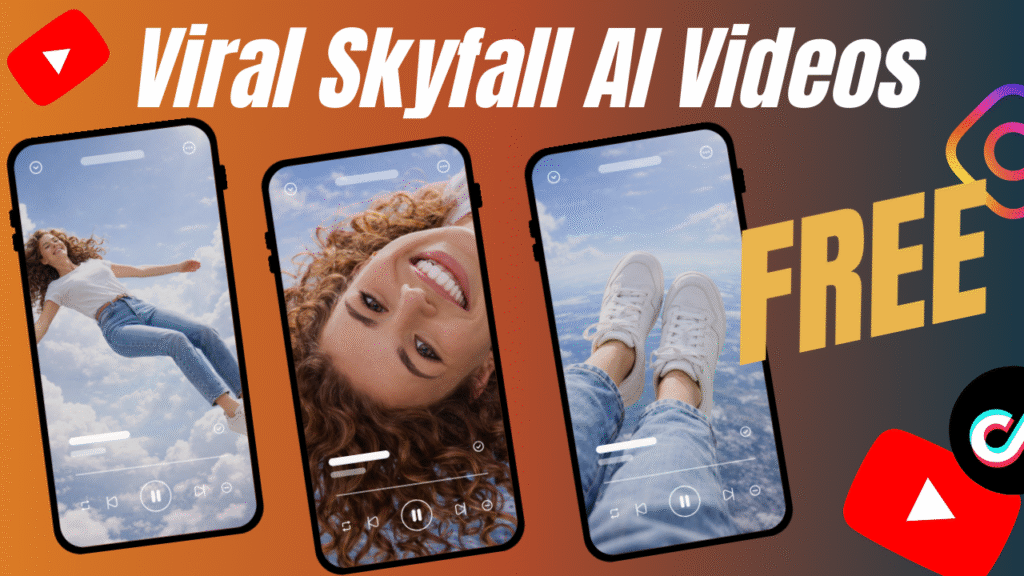
Yes—Viral Sky Fall AI Videos Trend has taken over social media.
But wait…
There is more.
These videos look expensive. They feel professional. They look like something created by a high-budget VFX studio.
And yet—
They are being created for free.
Are you wondering how creators are doing this without expensive software or paid AI subscriptions?
Don’t worry if you don’t have the budget to create AI videos.
Because in this guide, I’ll show you step by step how to create viral Sky Fall AI videos using 2 free AI tools, even if you’re a beginner.
The Viral Sky Fall AI Videos Trend is a short-form video style where a person or subject appears to fall dramatically from the sky, transitioning through multiple cinematic frames and ending with a powerful landing or reveal.
These videos work because they combine:
Motion psychology
Cinematic depth
AI-generated realism
Short-form storytelling
And this is not all.
They also perform extremely well with AI video generators because motion interpolation and depth transitions are exactly what AI excels at.
First of all, they stop the scroll.
Secondly, they trigger curiosity.
Third, they feel unreal—but believable.
Here’s why the Viral Sky Fall AI Videos Trend dominates:
Strong visual hook in the first 1.5 seconds
Cinematic vertical framing (perfect for Reels & Shorts)
Smooth AI motion instead of jump cuts
Minimal text, maximum emotion
This is why creators using an AI video generator are outperforming traditional editors.
You only need two free AI tools:
Sora – for generating cinematic images
Flow VEO 3 – for converting images into motion video
CapCut Desktop – for editing and watermark removal
That’s it.
No premium subscriptions.
No plugins.
No advanced editing skills.
Now comes the part you’re waiting for.
Are you wondering how to do it?
Let’s go step by step.
Go to Sora.
Upload your image (or use a prompt-based generation).
Create 5 different images showing different stages of the fall:
High in the sky
Mid-air
Closer to ground
Almost landing
Final landing frame
Download all images.
Why this works:
AI video generators perform best when given strong start and end frames.
Now go to Flow VEO 3.
Select “Frames to Video.”
Upload:
First image as the starting frame
Last image as the ending frame
Then write a simple animation prompt like:
“Smooth cinematic sky fall motion, slow motion, dramatic lighting, realistic depth, vertical 9:16.”
Wait—this is not all.
Repeat the process using:
Image 1 → Image 2
Image 2 → Image 3
Image 3 → Image 4
Image 4 → Image 5
You’ll now have multiple short video clips showing a continuous fall.
This technique turns still images into a fluid AI-generated story.
Once the videos are generated, download them.
Yes, they may include a watermark.
Don’t panic.
We’ll remove it legally and cleanly.
Open CapCut Desktop.
Upload all video clips.
Place them in sequence.
Now here’s the trick:
Slightly scale the video (102–105%).
This removes watermark edges without affecting quality.
Add:
Slow motion
Light color grading
Subtle sound effects
Export in:
9:16 ratio
1080p or 4K
60fps if available
Your Viral Sky Fall AI Videos Trend clip is ready.
Step 7: Upload on Social Media
Post on:
Instagram Reels
YouTube Shorts
TikTok
Use hashtags:
#ai #aivideos #gemini #aitools
Boom.
Your video is live.
Let’s be honest.
This is a free workflow.
So yes…
It takes:
Time
Patience
Trial and error
If you want to generate hundreds of AI videos daily, paid tools are faster.
But if you don’t have the budget to create AI videos…
This method works.
And it works well.
Many founders ask:
“What if I want longer ads?”
Here’s the honest answer.
With free tools:
You trade speed for cost savings
You trade scale for patience
You can:
Use multiple accounts (time-heavy)
Stack daily videos
Or upgrade later once ads start working
This free AI Video Generator method is not about speed.
It’s about momentum.
This workflow works because:
AI handles visuals
You control storytelling
Editing adds professionalism
There is more.
Short-form platforms prioritize:
Strong visuals
Fast storytelling
Emotional hooks
Cat AI videos naturally fit this formula.
On free VEO accounts, you get 100 credits per month, allowing around 5 videos.
But wait… there is more.
You can:
Use multiple accounts
Space uploads across days
Optimize prompts to reduce retries
This keeps your AI video generator workflow completely free.
Many creators fail because of these mistakes:
Using low-quality images
Over-complicated prompts
Too fast motion
Ignoring vertical framing
Over-editing transitions
Using random backgrounds
Forgetting lighting consistency
Avoid these and your Sky Fall videos will instantly improve.
Use darker skies for drama
Add wind sound effects
Keep clips under 5 seconds
Focus on realism, not fantasy
Let motion feel natural
Avoid flashy text overlays
Use cinematic LUTs
Test multiple versions
Post consistently
Analyze retention graphs
Before posting Sky Fall AI videos:
Avoid sensitive or misleading visuals
Don’t use copyrighted faces without permission
Read tool usage policies
Don’t misrepresent real events
Respect platform guidelines
Responsible use keeps your account safe.
The best AI video generator content ranks when:
Keywords appear naturally
Videos match search intent
Titles promise transformation
Content feels achievable
That’s why this trend converts viewers into followers.
The Viral Sky Fall AI Videos Trend proves one thing clearly:
You no longer need money to create high-impact content.
With the right AI video generator, smart sequencing, and cinematic thinking, even free tools can outperform paid production.
This is not the end.
This is just the beginning of AI-powered storytelling.
The Viral Sky Fall AI Videos Trend can be created using Sora, Flow VEO 3, and CapCut Desktop—all for free. By generating multiple images, converting them into motion clips, and editing smartly, you can create scroll-stopping videos without a budget.
Key Takeaways:
Use 2 free AI tools
Create image sequences
Convert images to motion
Edit lightly
Post consistently
At Samin AI Marketing Hub, we built our entire CGI advertising framework around one core insight: why AI ads are getting worse is not a technology issue—it’s a brand strategy failure. That’s why we don’t start with effects, prompts, or automation. We start with brand perception, buyer psychology, and conversion intent. Before a single frame is generated, we map your beauty brand’s positioning, price point, target audience, and emotional triggers. This ensures every AI ad we create reinforces trust, elevates perceived value, and supports sales—not just views.
We believe why AI ads are getting worse has nothing to do with AI tools—and everything to do with missing brand intelligence. Most ads fail because they start with effects instead of strategy. We reverse this completely.
Before creating any AI visuals, we define:
Brand positioning (luxury, masstige, indie, or clinical beauty)
Target buyer psychology and buying triggers
Price perception and value signaling
Platform-specific ad intent (paid ads vs organic virality)
Conversion goal (trust, education, or purchase)
This strategic foundation ensures every AI CGI ad supports brand perception first, not visual chaos. By anchoring creativity to intent, we eliminate the core problem behind why AI ads are getting worse and build ads that feel premium, intentional, and trustworthy to beauty consumers.
Once strategy is locked, we use AI as an enhancement layer—not a decision-maker. This is where most brands fail and why AI ads lose credibility. Our process is human-directed, conversion-focused, and realism-driven.
Our AI execution framework focuses on:
Studio-grade lighting to maintain luxury perception
Realistic material and texture simulation (glass, liquid, cream, shimmer)
Clear product hierarchy so the product remains the hero
Controlled motion that feels natural, not exaggerated
Camera angles designed to increase perceived product quality
Visual pacing aligned with beauty buying psychology
By blending AI speed with human creative control, we avoid the pitfalls that explain why AI ads are getting worse across the industry. The result is AI advertising that builds trust, supports sales, and protects long-term brand equity—especially for beauty brands targeting premium and U.S. markets.
At Samin AI Marketing Hub, we don’t chase viral visuals.
We build brand-safe AI ads that convert attention into revenue.
Ready to start creating viral, high-converting AI video ads for your brand? Join my AI Video Ads Mastery Course and learn how to create cinematic ads in minutes: no studio, no actors, no editing skills needed.
 Enroll now and transform the way you market in 2026.
Find quick answers to the most common questions about How to Create Viral Sky Fall AI VIDEOS Trend FREE? And discover how this simple editing step can instantly make your content more engaging, professional, and ready to grab attention in 2026.
The Viral Sky Fall AI Videos Trend is a cinematic short-form video style where a subject appears to fall from the sky in slow motion, creating a dramatic and eye-catching visual. These videos are generated using an AI video generator, which converts still images into realistic motion. Because of their cinematic feel and strong opening hook, they perform exceptionally well on Instagram Reels, YouTube Shorts, and TikTok.
Yes, it is absolutely possible to create Viral Sky Fall AI Videos Trend content for free. By using the free versions of tools like Sora and Flow VEO 3, creators can generate images and convert them into videos without paying anything. Even editing can be done using CapCut Desktop, making this method ideal for creators who don’t have the budget to invest in paid AI video generators.
Do I need professional video editing skills to follow this metho
No professional editing skills are required to create these videos. The tools used in this process are beginner-friendly and designed for ease of use. CapCut Desktop, in particular, allows users to combine clips, scale videos, and apply basic effects without prior editing experience. This makes the Viral Sky Fall AI Videos Trend accessible to anyone starting with AI videos.
Which AI video generator works best for Sky Fall videos?
Currently, Flow VEO 3 is one of the best AI video generators for creating smooth Sky Fall animations. Its “Ingredients to Video” feature allows users to upload starting and ending frames, which results in more controlled and cinematic motion. When combined with high-quality images from Sora, it delivers professional-looking results even on a free plan.
Can I monetize Viral Sky Fall AI videos on social media?
Yes, creators can monetize Viral Sky Fall AI Videos Trend content in multiple ways. These videos can generate income through YouTube Shorts monetization, Instagram Reels bonuses, brand collaborations, and even affiliate marketing. Because the trend attracts high engagement, it becomes easier to grow an audience and turn views into revenue over time.
BUT
You need to use your own Voiceover to monetize the content.
What is the ideal video length for better reach and engagement?
For maximum reach, Sky Fall AI videos should typically be between 3 to 7 seconds per clip. Shorter clips help maintain viewer retention and increase the chances of your video being pushed by the algorithm. When combined into a seamless sequence, these short clips create a powerful cinematic effect without losing audience attention.
Is removing the watermark in CapCut allowed?
Scaling the video slightly in CapCut Desktop to remove watermark edges is a commonly used and non-destructive editing technique. This method does not involve altering or hacking the AI tool itself. However, creators should always review the usage policies of the AI video generator they are using to ensure compliance with platform rules.
Can I use my own image for creating Sky Fall AI videos?
Yes, using your own image is not only allowed but often recommended. Personal images help make the Viral Sky Fall AI Videos Trend feel more authentic and relatable. AI video generators work best when the subject image is clear, well-lit, and properly framed, which increases the realism of the final video.
What export settings are best for social media platforms
For best results, export your Sky Fall AI videos in 9:16 vertical format with at least 1080p resolution. If available, 4K resolution and 60fps can further enhance video quality. These settings ensure your video looks sharp and professional across all major social media platforms.
Will the Viral Sky Fall AI Videos Trend still work in 2026?
Yes, the Viral Sky Fall AI Videos Trend is expected to remain relevant in 2026 because cinematic AI content continues to evolve and gain popularity. As AI video generators improve, this style of content will become even more realistic and engaging, making it a long-term opportunity for creators who start early.