


Scroll through Instagram.
Scroll through TikTok.
Scroll through YouTube Shorts.
You’ll see it.
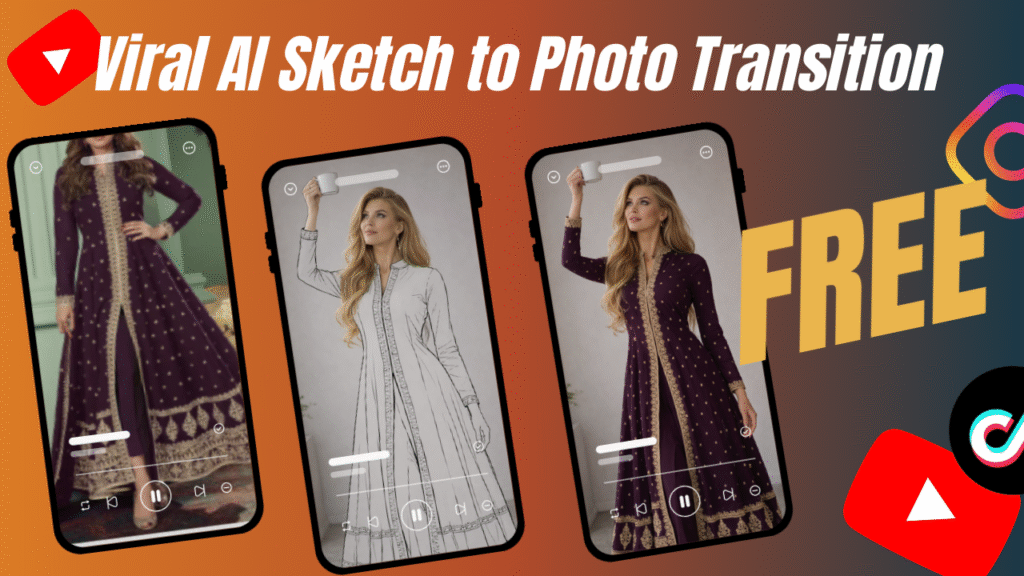
A pencil sketch.
Flat lines.
Minimal shading.
Then suddenly…
Boom.
Ultra-realistic fashion model.
Professional lighting.
Luxury branding.
“This Wasn’t Filmed by a Human.”
“AI Did This…”
And here’s the shocking part.
It takes less than 15 minutes.
You won’t believe this.
Major brands are using AI sketch to real photo transition videos inside generative AI advertising campaigns right now.
And there is more.
You can do it too.
For free.
No influencer. Just AI.
Let’s break it down.
The human brain loves transformation.
Before → After.
Sketch → Reality.
Concept → Execution.
That moment of transformation triggers dopamine.
And that dopamine drives:
Watch time
Engagement
Shares
Click-through rates
That’s why AI sketch to real photo transition content dominates short-form feeds.
In generative AI advertising, transformation visuals signal innovation.
It tells viewers:
“This brand is modern.”
“This brand understands technology.”
“This brand is ahead.”
Using AI in marketing is no longer optional.
It’s becoming the standard.
Before we jump into the steps, here’s what you’ll need:
Sora – for story creation and video animation prompts
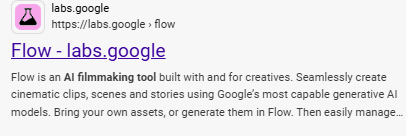
Google Flow – for text-to-video generation
CapCut PC – for combining scenes and editing
Patience and creativity
That’s it.
No paid software.
No subscriptions required.
Let’s walk through the exact workflow.
No confusion.
No fluff.
Just results.
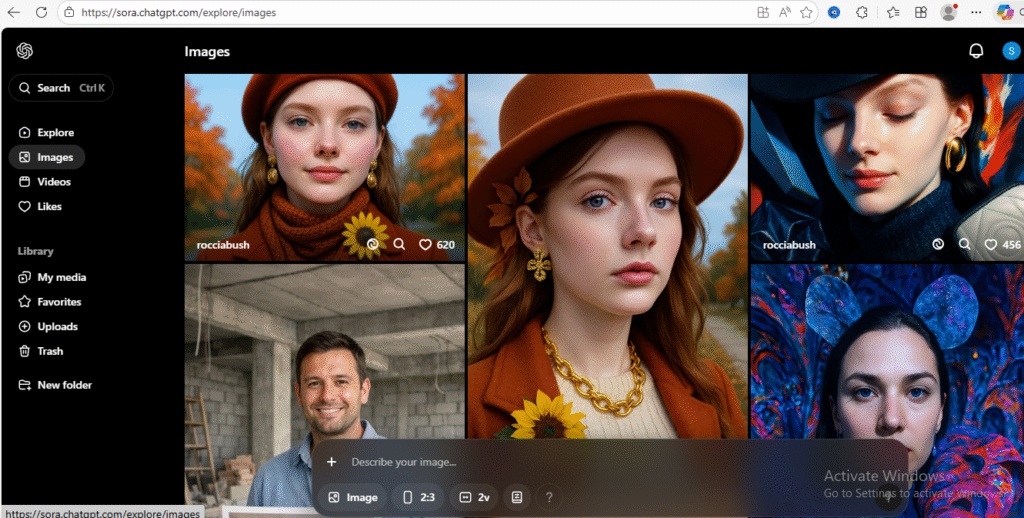
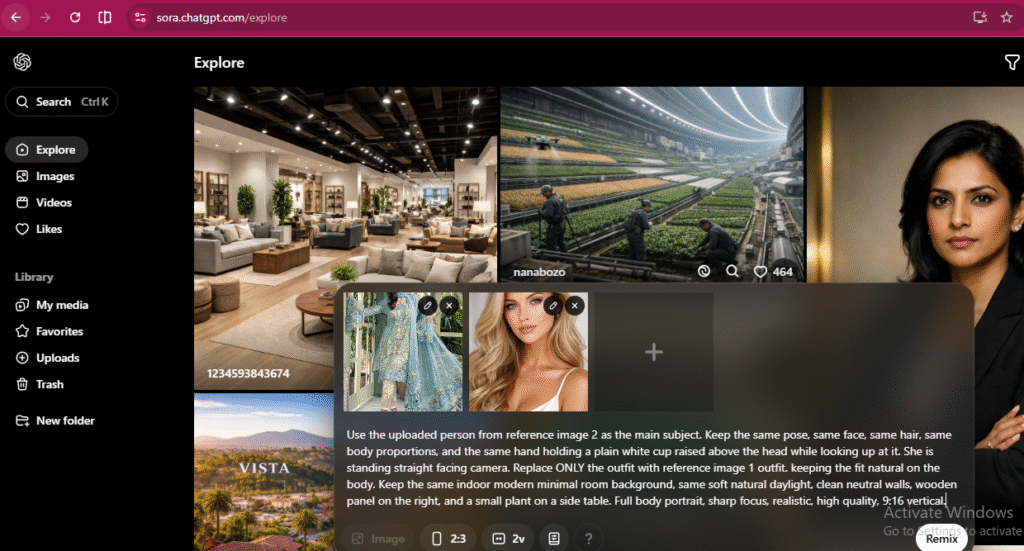
Upload:
Your product outfit
The model face image
Why both?
Because consistency matters.
If you skip alignment, the transition won’t feel smooth.
After uploading both images, write this prompt, Remember to change reference image number according to your own images.
Prompt:
“Use the uploaded person from reference image 2 as the main subject. She is standing straighth facing camera with same face, same hair, same body proportions, and the same hand holding a plain white cup raised above the head while looking up at it. Replace ONLY the outfit with the outfit from reference image 1, keeping the fit natural on the body. Keep the same indoor modern minimal room background, same soft natural daylight, clean neutral walls, wooden panel on the right, and a small plant on a side table. Full body portrait, sharp focus, realistic, high quality, 9:16 vertical.”
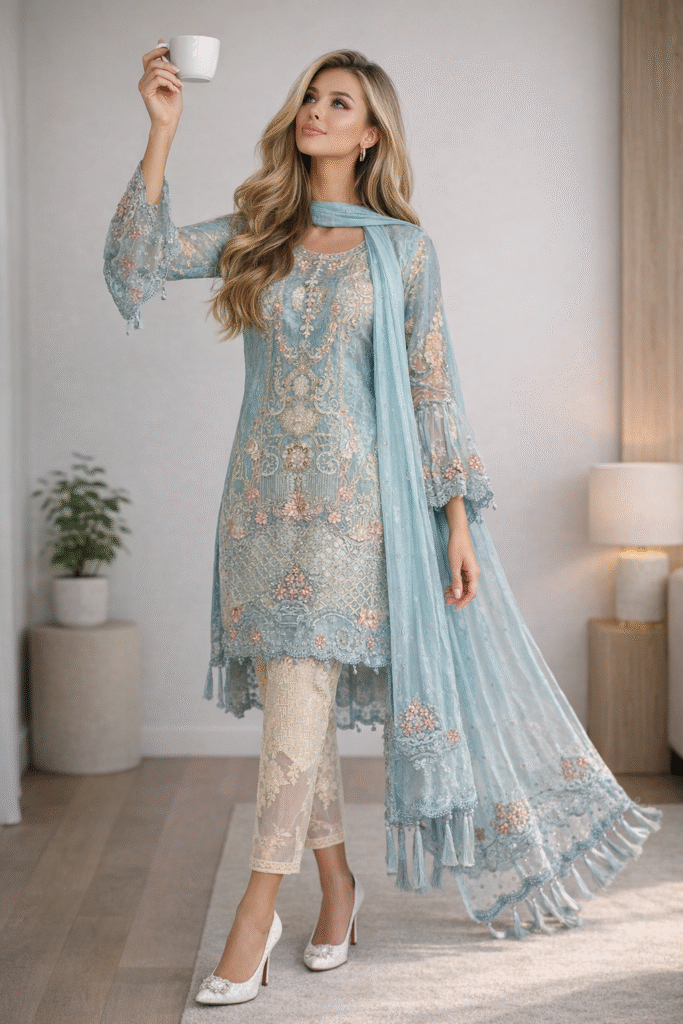
Once image is generated, Download it.
This is your final frame. And it will look like the image below.
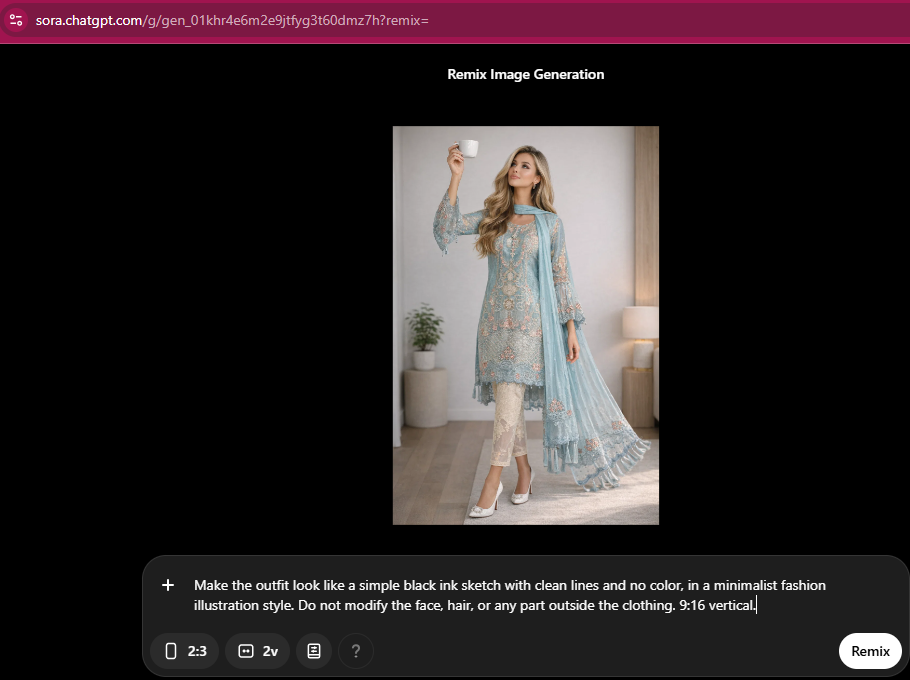
Now upload that generated image again.
Use a prompt like:
“Make only the outfit look like a simple black ink sketch with clean lines and no color, in a minimalist fashion illustration style. keep everything else the same. Do not modify the face, hair, or any part outside the clothing. 9:16 vertical.”
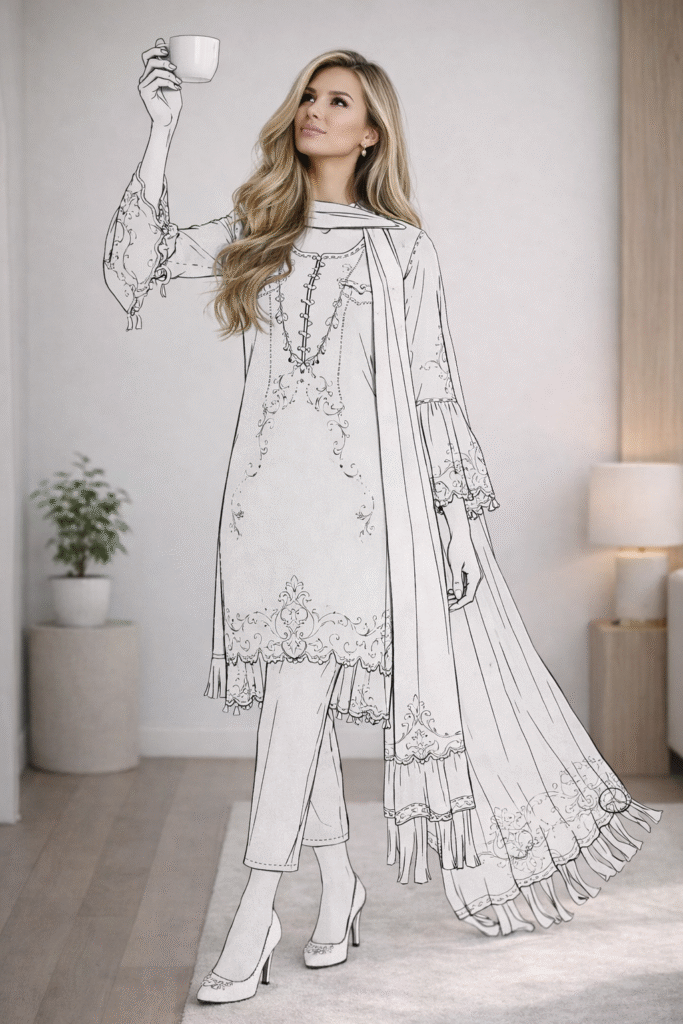
Download it.
This becomes your first frame.
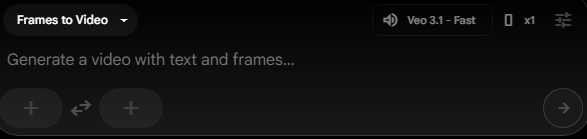
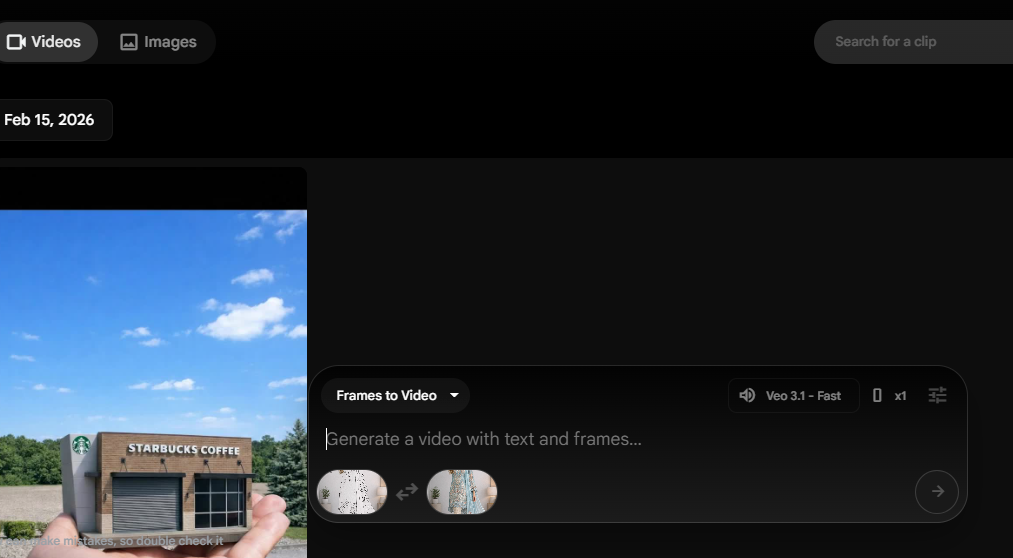
Upload:
Sketch as Frame 1
Real photo as Frame 2
Then write a video motion prompt like:
“The person in the image gently tilts the cup and slowly pours out paint in the exact color of the outfit. As the paint flows downward on the cloth, the clothing begins to reveal its true color, gradually filling from the top to the bottom—like watercolor naturally spreading and soaking through fabric. While the paint pours over the outfit, the person looks amazed and captivated by the transformation. Once the fabric is completely filled with its true vibrant colors, the person slowly returns the cup to its original upright position, maintaining the same pose.”
Click Enter.
Once generated, download your video.
Wait.
There is more.
It will have a watermark.
Open CapCut Desktop.
Import your video.
Change aspect ratio to 9:16.
Scale the video slightly upward until watermark disappears outside frame. Usually at 119% or 120%.
Export in 1080p.
Hurray.
Your AI Sketch to Real Photo Free video is ready — created using free AI tools.
No influencer needed.
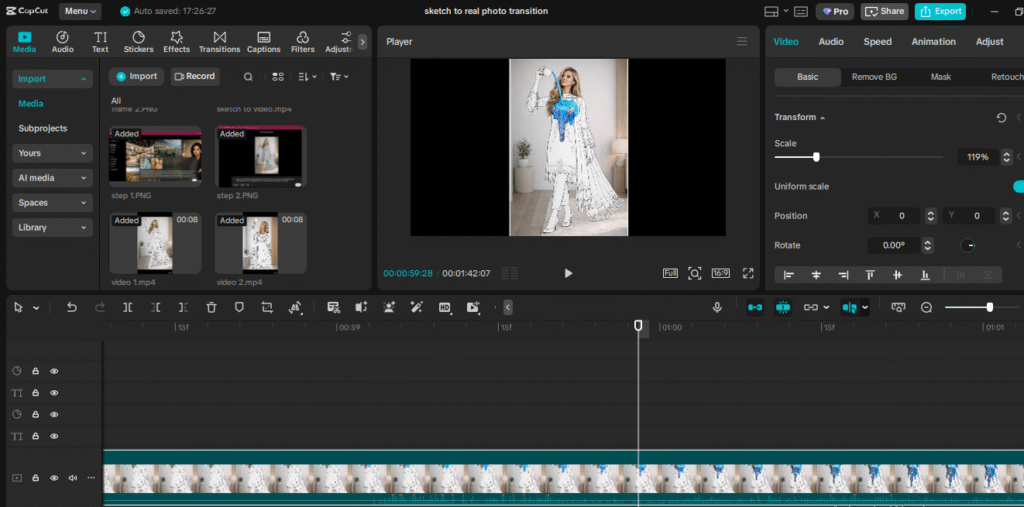
Export your final video in high resolution.
Congratulations.
You just completed full AI video creation for AI advertising without spending money.
Now upload your final clip as a short/Ad.
Pro tip:
Use cinematic music
Add short captions
Keep it under 20 seconds
Shorter videos loop better.
And looping equals more reach.
Traditional production requires:
Model booking
Studio rental
Lighting setup
Photographer
Editing team
Cost?
$2,000–$10,000 minimum.
Now?
Using AI in marketing reduces it to zero.
This is why:
“Brands Don’t Want You to See This.”
Because the barrier to entry has disappeared.
AI Ads Changed Real State ads Forever.
Now it’s reshaping fashion and ecommerce too.
The magic is simple:
Two still frames + AI motion interpolation = cinematic animation.
Instead of complex editing, Google Flow AI handles the transition automatically.
And because you control the first and last frame, the movement stays precise.
Brands don’t want you to see this — but this method removes production cost entirely.
| Feature | AI Sketch to Real Photo Transition | Traditional Photoshoot |
|---|---|---|
| Cost | Free | $2000+ |
| Time | 15 Minutes | 1–2 Weeks |
| Editing | Automated | Manual |
| Revisions | Instant | Expensive |
| Scalability | Unlimited | Limited |
You won’t believe this.
Small creators now compete with luxury brands.
| Feature | Generative AI Advertising | Traditional Marketing |
|---|---|---|
| Speed | Instant | Slow |
| Cost | Low | High |
| Flexibility | High | Limited |
| Testing Variations | Easy | Expensive |
| Creativity Range | Unlimited | Budget-bound |
Using AI in marketing gives creative freedom.
Even powerful tools fail with poor execution.
1. Mismatched Lighting
If the sketch lighting differs from the real photo, transition looks fake.
Always maintain:
Same angle
Same background
Same shadows
2. Overcomplicated Prompts
Keep prompts structured.
Too many instructions confuse the AI.
3. Ignoring Branding
Add:
Logo
Brand colors
Product focus
Generative AI advertising must remain brand-consistent.
Precautions When Using AI in Marketing
Let’s be responsible.
Avoid copyrighted images
Ensure model rights compliance
Don’t mislead with unrealistic product claims
Follow advertising guidelines
AI is powerful.
But ethics matter.
Be careful with:
Unrealistic lighting
Overly dark backgrounds
Poor resolution images
Mismatched perspective
Copyrighted elements
AI video generator tools are powerful, but input quality determines output quality.
Garbage in, garbage out.
Here’s how to amplify impact.
1. Add Text Hook
Start with:
“You Won’t Believe This.”
“This Wasn’t Filmed by a Human.”
“AI Did This…”
Curiosity increases retention.
2. Keep It Under 6 Seconds
Shorter = stronger loops.
3. Use Soft Sound Design
Sketch pencil sound → Camera shutter click.
Psychological trigger.
4. Test Multiple Variations
Different lighting.
Different model expressions.
Different backgrounds.
Generative AI advertising thrives on experimentation.
| Feature | Sora | Google Flow |
|---|---|---|
| Image Generation | Yes | No |
| Video Animation | Limited | Strong |
| Free Usage | Limited | Daily Credits |
| Ease of Use | Moderate | Beginner Friendly |
| Best For | Frame Creation | Motion Creation |
Together?
Unstoppable AI advertising workflow.
- Flow gives daily credits allowing at least one free video per account.
If you need multiple AI sketch to Photo Transition FREE outputs, you can manage multiple accounts responsibly within platform guidelines.
This is not all.
Batch your frame generation first.
Then animate all at once.
2) Batch create.
Generate 5 variations.
Test them.
Scale the best-performing one.
Don’t worry if you don’t have the budget to create AI videos.
Creativity > Budget.
The future of AI advertising is moving toward hyper-personalized, cinematic, and scalable content powered by advanced AI video generator tools. Brands will no longer rely solely on traditional shoots—instead, they will create adaptive campaigns that change visuals, messaging, and formats in real time based on audience behavior. As OBJECT MATERIALIZATION AI VIDEO FREE and similar techniques become mainstream, “AI Did This…” will no longer be surprising—it will be the new standard for high-performing digital ads.
The AI sketch to real photo transition is a powerful technique in generative AI advertising that allows brands using AI in marketing to create eye-catching transformation videos in minutes. By generating a realistic image and its sketch version, then animating the transition between them, you can produce high-impact content completely free. This method is fast, scalable, beginner-friendly, and perfect for modern digital campaigns that demand creativity without large production budgets.
AI sketch to real photo transition can be created in 15 minutes
Perfect for generative AI advertising
Powerful strategy for using AI in marketing
Requires Sora + Google Flow
Remove watermark easily with scaling
Maintain lighting consistency
Keep video short
Add hook text
Follow ethical practices
Test multiple versions
The future belongs to creators who adapt.
Using AI in marketing is no longer experimental.
It’s strategic.
AI sketch to real photo transition content feels magical.
But it’s just workflow.
And the brands that master this…
Win attention.
Win engagement.
Win sales.
No Influencer. Just AI.
- How to create Viral Dhurandhar AI BTS Viral Video Creation
- How to convert 1 image into Multiple Camera Angles
- How to create Viral Product Assembly Effect AI AD
- How to make Viral AI Sketch to Real Photo Transition
- Humanoid Water playing Football Animation in 5 Steps
- Object MAterialization Video Free using AI
- Viral Elevator Pop up Effect FRE AI AD
- Cozy Glass Capsule AI Ads using Free AI tools
- Viral AI Bed ASMR Videos using Free AI Tools
- Secret Method to create TimeLapse Home Construction AI ADs using FREE AI tools
At Samin AI Marketing Hub, we built our entire CGI advertising framework around one core insight: why AI ads are getting worse is not a technology issue—it’s a brand strategy failure. That’s why we don’t start with effects, prompts, or automation. We start with brand perception, buyer psychology, and conversion intent. Before a single frame is generated, we map your beauty brand’s positioning, price point, target audience, and emotional triggers. This ensures every AI ad we create reinforces trust, elevates perceived value, and supports sales—not just views.
We believe why AI ads are getting worse has nothing to do with AI tools—and everything to do with missing brand intelligence. Most ads fail because they start with effects instead of strategy. We reverse this completely.
Before creating any AI visuals, we define:
Brand positioning (luxury, masstige, indie, or clinical beauty)
Target buyer psychology and buying triggers
Price perception and value signaling
Platform-specific ad intent (paid ads vs organic virality)
Conversion goal (trust, education, or purchase)
This strategic foundation ensures every AI CGI ad supports brand perception first, not visual chaos. By anchoring creativity to intent, we eliminate the core problem behind why AI ads are getting worse and build ads that feel premium, intentional, and trustworthy to beauty consumers.
Once strategy is locked, we use AI as an enhancement layer—not a decision-maker. This is where most brands fail and why AI ads lose credibility. Our process is human-directed, conversion-focused, and realism-driven.
Our AI execution framework focuses on:
Studio-grade lighting to maintain luxury perception
Realistic material and texture simulation (glass, liquid, cream, shimmer)
Clear product hierarchy so the product remains the hero
Controlled motion that feels natural, not exaggerated
Camera angles designed to increase perceived product quality
Visual pacing aligned with beauty buying psychology
By blending AI speed with human creative control, we avoid the pitfalls that explain why AI ads are getting worse across the industry. The result is AI advertising that builds trust, supports sales, and protects long-term brand equity—especially for beauty brands targeting premium and U.S. markets.
At Samin AI Marketing Hub, we don’t chase viral visuals.
We build brand-safe AI ads that convert attention into revenue.
Ready to start creating viral, high-converting AI video ads for your brand? Join my AI Video Ads Mastery Course and learn how to create cinematic ads in minutes: no studio, no actors, no editing skills needed.
 Enroll now and transform the way you market in 2026.
Find quick answers to the most common questions about How to Create AI Sketch to Photo Transition Video FREE? And discover how this simple editing step can instantly make your content more engaging, professional, and ready to grab attention in 2026.
AI sketch to real photo transition is a generative AI advertising technique where a pencil-style sketch smoothly transforms into a hyper-realistic image. It is widely used in using AI in marketing campaigns to create engaging transformation visuals. The effect increases watch time and improves audience engagement.
Yes, you can create AI sketch to real photo transition using free AI tools with available credits. Some platforms may add watermarks, but simple scaling techniques can remove them visually. Always follow platform terms when using AI in marketing.
Google Flow AI provides daily credits that allow users to generate videos for free within certain limits. This makes it accessible for beginners and small creators who want to experiment with the elevator pop up effect without investing in expensive software. However, credit limits may apply depending on usage.
Do the generated videos include a watermark?
Yes, videos generated using free AI tools may include a watermark. However, you can remove it by importing the video into CapCut Desktop, adjusting the aspect ratio to vertical (9:16), and scaling the video slightly so the watermark moves outside the visible frame. This simple workaround helps you produce clean, professional-looking content.
Why do brands use this transition?
Brands use AI sketch to real photo transition because transformation content captures attention instantly. In generative AI advertising, before-and-after visuals perform exceptionally well. It positions the brand as innovative and modern.
No prior editing experience is required. Google Flow AI automates the animation process, meaning you only need to upload the frames and provide a motion prompt. This makes the elevator pop up effect beginner-friendly and accessible even to non-designers.
Can this improve conversion rates?
Yes, when paired with strong messaging, AI sketch to real photo transition increases engagement and curiosity. Higher watch time improves algorithm reach. This leads to better performance in generative AI advertising campaigns.
Is this suitable for ecommerce brands?
Absolutely. Ecommerce brands benefit from dynamic product showcases using AI in marketing. Sketch-to-real transitions highlight product quality and transformation.
How long should the video be?
Short-form videos between 5–8 seconds perform best. Generative AI advertising works well in loop format. Keep it concise for maximum impact.
What industries can use this?
Fashion, beauty, tech, and lifestyle brands can all leverage AI sketch to real photo transition. Using AI in marketing is adaptable across industries. Creative prompts determine versatility.
Is this method sustainable for long-term AI advertising strategy?
Yes, AI Sketch to Photo Transition can be scaled for long-term AI advertising if paired with strategic messaging. Brands can create multiple variations using the same AI video generator workflow. This makes it both cost-efficient and adaptable for ongoing campaigns.
Is generative AI advertising the future?
Yes, generative AI advertising is rapidly reshaping digital marketing. Brands using AI in marketing gain speed and creative scalability. It reduces production cost while increasing innovation.
Can beginners succeed with this?
Yes. Clear prompts and structured workflow are enough to create professional results. AI sketch to real photo transition democratizes high-end marketing visuals.