


Let’s be honest.
Instagram Reels, Shorts, and TikTok are no longer about random clips.
They are about cinematic storytelling.
And suddenly, one trend is everywhere.
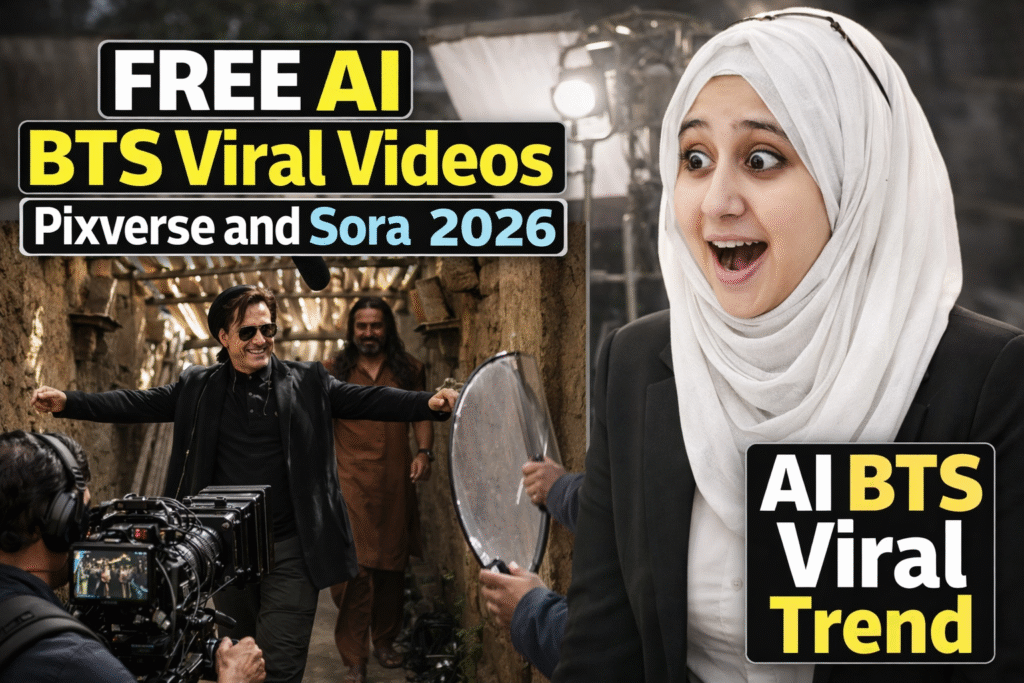
👉 DHURANDHAR AI BTS Viral VIDEO
You’ve seen it.
Behind-the-scenes style visuals.
Movie-like characters.
Cinematic lighting.
Realistic motion.
And people are asking the same question:
“How are they making this?”
Wait—there is more.
Most creators assume this trend requires:
-
Paid tools
-
Expensive AI subscriptions
-
Advanced video editing skills
But the real twist is yet to come…
You can create DHURANDHAR AI BTS Viral VIDEO using a free AI video generator.
Yes.
No watermark.
No advanced editing.
No budget.
Don’t worry if you don’t have the budget to create AI videos—this guide is for you.
Dhurandhar is a major Bollywood spy action thriller released in India on December 5, 2025, directed by Aditya Dhar and starring Ranveer Singh alongside a strong ensemble cast including Akshaye Khanna, Sanjay Dutt, R. Madhavan and Arjun Rampal. The film blends intense espionage, action and dramatic storytelling, and has achieved remarkable success at the box office both domestically and globally, becoming one of the highest-grossing Indian films of the year and breaking several records with its sustained theatrical run. Its popularity has also sparked anticipation for a sequel, with Dhurandhar Part 2 scheduled for release in March 2026
Before we jump into steps, let’s understand the concept.
A DHURANDHAR AI BTS Viral VIDEO is:
-
A cinematic AI-generated video
-
Styled like behind-the-scenes footage
-
Created from a single AI image
-
Animated using AI video creation tools
-
Optimized for Instagram Reels virality
It feels real, even though it’s fully AI-generated.
That’s why it works.
People don’t just watch it.
They stop scrolling.
And that’s exactly why this trend is dominating 2026.
Here’s the truth.
First of all, this is not everything…
The real power of DHURANDHAR AI BTS Viral VIDEO is accessibility.
You don’t need:
-
A production team
-
Cameras
-
Editors
-
Paid AI subscriptions
You only need:
-
A free AI video generator
-
A little patience
-
Smart prompts
That’s it.
And yes, this method is 100% free.
Let’s break it down clearly.
1. SORA (AI Image Generation)
Used to generate cinematic movie-style images from text.
2. PixVerse (AI Video Creation)
Turns your image into an animated BTS-style viral video.
3. VMake.ai (AI Upscale Video + Watermark Removal)
Removes watermark and improves final quality.
Together, these tools enable:
-
AI video creation
-
AI upscale video
-
Viral-ready reels
-
Zero cost workflow
Now comes the part you’re waiting for.
Are you wondering how to do it?
Let’s go step by step.
Go to Sora.
Now, this is important.
You’re not just writing a random prompt.
You need to describe:
BTS environment
Cinematic realism
Camera perspective
Upload your Movie Clip and write this prompt.
Exact Prompt:
“Convert the uploaded movie or series screenshot into a realistic behind-the-scenes movie shoot. Keep the original scene composition, character positions, expressions and wardrobe unchanged. Show a real on-location film set with a cinema camera on a shoulder rig or dolly track, camera operator in action, crew members holding reflectors, diffusion panels and portable lights, a boom microphone extending into frame, production equipment and cables subtly visible. Use natural daylight or location-based lighting with believable shadows, atmospheric depth and realistic scale. Camera placed at natural human eye-level or slightly low angle, avoiding high-angle or overhead perspective. The scene should feel like a real leaked behind-the-scenes photograph from a professional outdoor film shoot, cinematic realism, 8K quality.”
This prompt helps Sora understand the AI BTS Viral Trend aesthetic.
Once generated… Go to Step 2
Here’s something most people mess up.
Not every generated image is good enough.
You must choose an image with:
Clear facial details
Realistic lighting
Cinematic composition
No distortion
Because remember…
The quality of your AI video depends entirely on your image.
Low-quality image = bad AI video.
Now go to PixVerse.
This is where the magic happens.
Upload the image you downloaded from Sora.
PixVerse allows you to generate AI video from a static image using animation prompts.
This is where most creators fail.
They write weak prompts.
Instead, describe motion clearly.
Go to Pixverse.ai.
Upload your downloaded image from Sora into Pixverse and write this prompt.
Exact Prompt:
“Short cinematic behind-the-scenes animation. Handheld BTS-style camera with fast but controlled 360-degree rotational movement, as if a camera operator quickly circles the actors on set. Rotation feels natural and human, not mechanical, with slight handheld shake and realistic motion blur. Camera maintains consistent distance while rotating, creating strong parallax between foreground equipment and background crew. Crew members make subtle natural movements, boom microphone swings slightly, lights vibrate minimally, cables and fabric show micro motion. Characters remain mostly still, holding their performance activity. Cinematic lighting stays consistent throughout the rotation, ultra-realistic motion, no artificial or game-like feel.”
This tells PixVerse:
What should move
How it should feel
What style to follow
Click generate.
Your AI BTS Viral Trend reel will be created…
But yes—there will be a watermark.
Don’t panic.
Download the video anyway.
Why?
Because we’re about to remove the watermark—for free.
And wait…
This is not all.
Go to vmake.ai.
Upload your PixVerse video.
Select:
Smart Watermark Remover
Within minutes, you’ll receive a clean video.
No watermark.
No quality loss.
Completely free.
This is how creators make AI videos without paying.
Your final DHURANDHAR AI BTS Viral VIDEO is ready:
-
No watermark
-
Cinematic motion
-
Viral-ready
-
100% free
Yes, it takes time and patience.
But it works.
Now upload your final clip as a Reel.
Pro tip:
Use cinematic music
Add short captions
Keep it under 6 seconds
Shorter videos loop better.
And looping equals more reach.
Let’s be honest.
This is a free workflow.
So yes…
It takes:
Time
Patience
Trial and error
If you want to generate hundreds of AI videos daily, paid tools are faster.
But if you don’t have the budget to create AI videos…
This method works.
And it works well.
Many founders ask:
“What if I want longer ads?”
Here’s the honest answer.
With free tools:
You trade speed for cost savings
You trade scale for patience
You can:
Use multiple accounts (time-heavy)
Stack daily videos
Or upgrade later once ads start working
This free AI Video Generator method is not about speed.
It’s about momentum.
Always respect copyright boundaries. Avoid commercial misuse of copyrighted characters.
Do not overuse the same prompt repeatedly—Instagram favors originality.
Ensure faces and movements look natural. Uncanny visuals reduce trust.
Avoid uploading low-resolution outputs.
Don’t rush the image selection step—it defines everything.
Before you rush—wait.
There is more you must know.
Important Precautions
-
Don’t rush prompts
-
Avoid blurry images
-
Use cinematic language
-
Keep motion subtle
-
Don’t overload effects
A free AI video generator works best when guided properly.
Let’s talk reality.
Most people fail because of these mistakes:
-
Using low-quality images
-
Writing vague prompts
-
Over-animating scenes
-
Ignoring lighting realism
-
Posting without testing
-
Expecting instant virality
-
Using wrong aspect ratio
-
Skipping AI upscale video
-
Posting inconsistent content
-
Giving up too early
Avoid these, and your AI video creation quality improves instantly.
Now the good part.
Here are pro tips that actually work:
-
Use movie-style prompts
-
Keep motion slow and cinematic
-
Add BTS realism keywords
-
Always upscale video
-
Test multiple prompts
-
Post consistently
-
Focus on storytelling
-
Use trending audio
-
Optimize captions
-
Use Flipperachi background music for more engagement.
-
Stay patient
Remember—viral success is about repetition, not perfection.
If you want to create more videos faster, you can use multiple Gmail accounts to access daily free credits on PixVerse or explore PixVerse’s built-in credit-earning tasks. This way, you can generate more AI BTS Viral Trend videos without upgrading to a paid plan, test multiple reel ideas, and increase your chances of going viral consistently.
DHURANDHAR AI BTS Viral VIDEO proves one thing clearly:
You don’t need money to create viral content—only strategy.
Using a free AI video generator, smart AI video creation, and simple watermark removal, you can compete with big creators in 2026. Yes, this method requires patience. Yes, it takes time. But the reward is massive reach, engagement, and visibility.
If you stay consistent, refine prompts, and focus on cinematic storytelling, this AI trend can completely change your content game.
DHURANDHAR AI BTS Viral VIDEO can be created in 2026 using a free AI video generator without expensive tools or advanced editing skills. By combining AI image generation, AI video creation in PixVerse, and simple watermark removal with AI upscale video tools, anyone can produce cinematic, BTS-style viral Instagram Reels with patience and the right prompts.
This step-by-step method proves that you don’t need a big budget to make viral content. With consistent testing, smart prompts, and basic precautions, DHURANDHAR AI BTS Viral VIDEO creation becomes a repeatable strategy for creators who want high-quality, watermark-free AI videos that actually perform on social media.
-
DHURANDHAR AI BTS Viral VIDEO is a top trend in 2026
-
Uses free AI video generator tools
-
No watermark required
-
Perfect for beginners
-
Requires patience, not budget
If you want more videos, use multiple accounts responsibly or earn free credits inside PixVerse. Stay consistent, keep experimenting, and let AI video creation work for you.
At Samin AI Marketing Hub, we built our entire CGI advertising framework around one core insight: why AI ads are getting worse is not a technology issue—it’s a brand strategy failure. That’s why we don’t start with effects, prompts, or automation. We start with brand perception, buyer psychology, and conversion intent. Before a single frame is generated, we map your beauty brand’s positioning, price point, target audience, and emotional triggers. This ensures every AI ad we create reinforces trust, elevates perceived value, and supports sales—not just views.
We believe why AI ads are getting worse has nothing to do with AI tools—and everything to do with missing brand intelligence. Most ads fail because they start with effects instead of strategy. We reverse this completely.
Before creating any AI visuals, we define:
Brand positioning (luxury, masstige, indie, or clinical beauty)
Target buyer psychology and buying triggers
Price perception and value signaling
Platform-specific ad intent (paid ads vs organic virality)
Conversion goal (trust, education, or purchase)
This strategic foundation ensures every AI CGI ad supports brand perception first, not visual chaos. By anchoring creativity to intent, we eliminate the core problem behind why AI ads are getting worse and build ads that feel premium, intentional, and trustworthy to beauty consumers.
Once strategy is locked, we use AI as an enhancement layer—not a decision-maker. This is where most brands fail and why AI ads lose credibility. Our process is human-directed, conversion-focused, and realism-driven.
Our AI execution framework focuses on:
Studio-grade lighting to maintain luxury perception
Realistic material and texture simulation (glass, liquid, cream, shimmer)
Clear product hierarchy so the product remains the hero
Controlled motion that feels natural, not exaggerated
Camera angles designed to increase perceived product quality
Visual pacing aligned with beauty buying psychology
By blending AI speed with human creative control, we avoid the pitfalls that explain why AI ads are getting worse across the industry. The result is AI advertising that builds trust, supports sales, and protects long-term brand equity—especially for beauty brands targeting premium and U.S. markets.
At Samin AI Marketing Hub, we don’t chase viral visuals.
We build brand-safe AI ads that convert attention into revenue.
Ready to start creating viral, high-converting AI video ads for your brand? Join my AI Video Ads Mastery Course and learn how to create cinematic ads in minutes: no studio, no actors, no editing skills needed.
 Enroll now and transform the way you market in 2026.
Find quick answers to the most common questions about How to Create DHURANDHAR AI BTS Viral Video using FREE PIXVERSE in 7 Steps? And discover how this simple editing step can instantly make your content more engaging, professional, and ready to grab attention in 2026.
It is a cinematic AI-generated behind-the-scenes style video created using a free AI video generator and AI video creation tools. Dhurandhar movie was exploding in December 2025 and this trend is referred to as the DHURANDHAR AI BTS Viral Trend.
Yes, ChatGPT plays a powerful role in the AI video creation process. It helps you generate detailed image prompts, enhance visuals into a commercial-grade look, and write precise video animation prompts. When combined with an AI video maker like PixVerse, ChatGPT ensures the final AI video looks intentional, cinematic, and suitable for advertising rather than random or low quality.
Yes, PixVerse offers limited free credits daily, making it ideal for beginners.
Can I remove watermark for free?
Yes, VMake.ai allows watermark removal using smart AI tools.
Do I need video editing skills?
No. This workflow is beginner-friendly and fully AI-powered.
Is this method safe for Instagram in 2026?
Yes, AI BTS Viral Videos are currently performing extremely well on Reels.
Can I make AI videos for this trend for free?
Yes. Using Sora, PixVerse, and Vmake.ai, you can make AI videos without paying—though it requires patience.
Is PixVerse beginner-friendly for generating AI video?
Absolutely. PixVerse is simple and works well when paired with strong prompts.
Does watermark removal reduce quality?
Using Vmake.ai smart remover keeps quality intact when done correctly.
What is a DHURANDHAR AI BTS Viral VIDEO and how does it relate to free AI video tools?
A DHURANDHAR AI BTS Viral VIDEO refers to a behind-the-scenes cinematic-style short clip created using AI, which can mimic the look and feel of movie BTS moments. With a free AI video generator workflow using Sora, PixVerse, and VMake.ai, you can make AI videos like this without cost — making cinematic content accessible even without a paid subscription.
Can I really create quality AI video content without professional skills?
Yes — with the right prompt and sequence of tools, you can generate AI video content that looks polished and cinematic. Using Sora to generate a high-quality image, PixVerse for animation, and then removing the watermark with VMake.ai, you can perform effective AI video creation even as a beginner.
How does using AI upscale video tools improve my final reel?
Using AI upscale video or watermark removal tools like VMake.ai not only clears the watermark from your PixVerse video but also enhances video quality, making your AI BTS Viral Videos sharper and more compelling — especially important for social platforms like Instagram Reels and TikTok where clarity drives engagement.
Are there limitations to using free AI video generators for this trend?
Yes, free tools often limit daily credits, video length, and resolution. While you can create a DHURANDHAR AI BTS Viral VIDEO with no budget, it takes patience and careful prompt crafting. If you run out of daily free credits on PixVerse, you may need to wait or use alternate accounts to continue testing.
What platforms work best for sharing AI BTS Viral Videos?
Short-form platforms like Instagram Reels, TikTok, and YouTube Shorts are ideal for showcasing AI BTS Viral Video content. These platforms favor engaging, cinematic clips — especially ones that look like behind-the-scenes footage — and using free AI video creation methods helps creators post consistently without high production costs.